

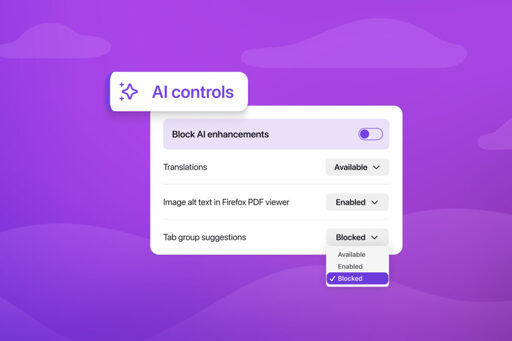
Starting with Firefox 148, which rolls out on Feb. 24, you’ll find a new AI controls section within the desktop browser settings. It provides a single place to block current and future generative AI features in Firefox.
They actually listened to the community, thats very nice.
That’s all well and good that they give you the ability to turn it off. What’s not changing though is that most of their focus will be on integrating AI which most people don’t want. As a result the pace of other new features being tested/implemented will probably slow significantly.
Plus, even if you can turn it off, the feature is still in the code, needing updates, etc., even if you don’t ever use it. Literal bloat.
Don’t forget adding additional surface area for security vulnerabilities. Does the off switch prevent a zero day attack via that code? Of course not.
The feature would likely need to be enabled to take advantage of such vulnerability in said feature.
At least these features won’t introduce any novel security holes! /s
I agree that AI chatbots are absolutely useless and have no place in a browser, but out of the three ML features in the screenshot, one is great for blind people, and another one is great for making the web more multilingual, so their usefulness is quite self-evident. Regarding ethics, at least for the last one it’s using a local model, and was trained using open-source datasets.[1]
What makes so-called “AI” bad is not the amount of users that can benefit from it, but how useful it is to the people that do use the feature, which usually means having experts tailor machine learning unto a single purpose.
I personally use the translation feature at least once a week when looking at news article that are not in English, and now I’m using a lot to translate Japanese webpages to plan a holiday there, so I’m very happy that Mozilla has invested time abd collaborated with universities to make this feature, I wish other people were less flippant about it just because it has “AI” in its name.
[1] https://hacks.mozilla.org/2022/06/training-efficient-neural-network-models-for-firefox-translations/
It seems pretty clear to me that despite the ambiguity of the term AI, people are specifically railing against LLMs, not ML. It also seems clear to me that the new Firefox direction as announced by their CEO is to incorporate more LLM specifically into the browser.
LLM is a subset of ML. Now screen reader also use LLM to describe image for visual impair users.
Some of these are tiny LLM that run on mobile hardware.
There are also LLM that specialize in translation (TranslateGemma), specialized in coding (QwenCode/Devstral), OCR (QwenVL), etc…
I feel that people should chill out and stop these irrational hate.
I’ve already moved several family members away from Chrome, Firefox etc
Waterfox, while sharing a basic codebase, doesn’t have any of this bullshit and runs like a dream.
HDR never, woo…
Since “AI” doesn’t exist, anything can be “AI”.
For example, a translation program is not “AI”.
But people do want features like translation regardless of how they’re dishonestly marketed.
Also we have all seen this movie before. They launch with promises of having a choice to turn it on or off… until it’s no longer a choice.
When did Firefox take away a choice that was previously offered?
All the freaking time?
A lot of these are extensions that are folded into the main Firefox feature set, experimental features or not even related to the browser?
Pocket’s dead now.
Like another user said, where’s “open image in new tab”? (I notice you didn’t reply to them.)
Remember XUL extensions and real browser themes?
Remember when you didn’t need a developer account to make extensions and you could distribute them via your own website?
But of course, Firefox never takes away choices that were previously offered.
Didn’t people generally hate pocket’s forced integration? Anyways I’ve never said that they’ve never removed features nor was disagreeing that what you said isn’t generally true. It’s just that the list posted has a lot of examples that aren’t exactly a removal of a Firefox feature which hurts the argument being made. There’s more than enough reasons as you mentions to make a case for it.
I don’t see where’s the relevance in pointing out that I didn’t reply to another user’s post when I’m in agreement with them.
Relax man, let’s have a civil discussion that doesn’t devolve into sarcasm.
Pocket was originally an extension before Mozilla forced integration and bloated it into something it wasn’t. The “something it wasn’t” part, Stories, is still Firefox bloatware but without the Pocket label.
“Open image…” is still there. If you’re not seeing it anymore, it’s sites taking it away from you. (I notice you didn’t check before getting outraged.)
I did check. It’s not there.
It’s there for me. It seems like they took away the “View image” option, which would open the image in the same tab rather than a new one?
The “open image in new tab” context menu option, off the top of my head, it has been 1000 small things with them, no 1 outrageous removal, but tons of them that didnt make big impacts yet still annoyed people who used them.
Edit: It was actually “View Image”, “Open Image in New Tab” was the alternative that remained. It was removed in v88
Bugtracker Link
Since when is “open image” gone for you? Are you sure it’s not the site blocking you? Many do that these days, but FF still has the option. There are some addons that can circumvent sites trying to block you (part of the functionality of https://addons.mozilla.org/en-US/firefox/addon/search_by_image/ for instance)
I partially misremembered, it was “View Image” and I updated the above post with details.
Actually now that I checked my Firefox, it’s still there? I’m on version 147.
My bad, I misremembered, it was “View Image”, “Open Image in New Tab” was what Mozilla claimed was the solution in the bug tracker. It was removed in v88
This happened quite often for various UI settings etc. Often there were technical reasons for removing the option (e.g. rewrites where they dropped features with low usage), but it is a real thing.
You were always able to turn it off, now it’s easier.
You haven’t seen this movie before with Firefox. All the ad stuff and sponsoring integrations like Pocket were always very easy to turn off.
Are you talking about Microsoft?
What features do you still need after 22 years of development?
HDR, hardware accelerated/parallelized layout/browser engine (servo)
To be fair, their reduced focus and the potential pace improvement through LLM assisted coding might cancel each other out. I wouldn’t be surprized if the resulting pace change is net zero or better.
That said: I like Firefox local translations, but haven’t found a use case for its other AI features yet.
Have we actually seen any evidence that LLM’s increase the pace of coding? Because in most of the reports I’ve seen there is no measurable difference even when users feel like they’re faster
I can get LLM to write prototypes and demos in the background while I am working on other parts of the code at the same time.
with the right prompt, I can generate and scaffold documentation pages, which I may not have time to do so.
Things are happening in the background and I get more done.
I feel like I am faster?
Feeling like you’re faster just because you can generate easy, boilerplate code doesn’t actually mean you’re faster if it spits out junk or takes longer to debug/integrate that code, or if tasks require more complex work that LLMs are bad at.
I just wanted to see some concrete stats given how much everyone is implementing it and hyping it up, as anecdotal evidence is easily biased by shiny new toy syndrome.
How about giving it a try.
If you happen to have work that is primarily text based (like programming).
Pick something that you have expertise on, and see LLM can help to automate it. Usually this requires using LLM with tooling that provides agentic capability (if you are into this, checkout Opencode / Kilocode / Roo code).
Once you get a hang on it, try to mix it up with skill gap that you are less knowledgeble of, but have an idea of what you are trying to accomplish. This is what fascinate me.
Don’t jump straight into vibe coding or domain with 0 knowledge and expect good and repeatable result (not now at least).
In my case, I am a Web UI developer, I have quite an extensive knowledge on that. For serious work, I can provide (or get it to reference) my requirement, so that it create close to 85-95% of what I need. I can easily verify and make modification. If not, just delete the entire work, refine my original idea and ask LLM to try again.
But occassionaly I need to test my work on native iOS and Android device. These are not my expertise and I have no interest in learning them yet. In the past, I will either get help from someone to build a prototype for me, or learn and read docs to create a lower quality outcome.
Now, i ask LLM to create a prototype in 5 minutes. Then add different scenario and features in the next 5 minutes, allowing me to test my work and iterate much faster. If I really want to do that myself, it may take a day or 2, time that I could have spent improving my own work.
These are throw away work that will only be used a few times. I don’t care about maintaining or debugging it.
Another case is again report and visualization generation for data. Instead of reading several pages of documentation on how to create these visualization and trying to architect the data flow. Now i just ask LLM to “given this data that shows the relationship between x and y, create a report with visualizatiom focus on xyz”.
Nowasday LLM produce work that already surpass what a junior-mid developer can produce. And if I am not satisfied with the work, I will just delete the entire work and redo. No hard feeling, no need to convince the orher person that their time has just gone to waste.
The only worry I have now is when people stopped learning because of this. And that companies stop hiring new junior developers.
Without junior developers, there will be no senior developers. Or maybe LLM will eventually make expert obsolete? Right now I don’t think it is possible yet.
What ive read, and what is accurate according to my experience, is that its very fast for creating smaller pieces of code, like scripts, foundations, docs etc. So with a small context, its great.
As soon as you start to ask it to add features to a larger code base, it will mess things up and add code that is not necessary, and add extra complexity. And it will now be slower to use Ai than before, because now you are spending time iterating and correcting, and you may not even get a working solution at all.
Thats my experience with Ai.
I think it does speed things up, since it can generate syntax quickly, but its not very good code and leads to a big mess. Eventually you want to rewrite from scratch yourself.
But I think it helps for sure. The alternative to find all syntax yourself and write it correctly is very time cons unik, although you also gain a much better understanding by doing that.
There are some concerns but yes, development generally accelerates: https://arxiv.org/abs/2507.03156
They meant with the cleaning up after it.
So they AI summarized other people’s work.
And later acknowledge there are major gaps in methodology. I wouldn’t be linking to this as proof of accelerated dev imho.