

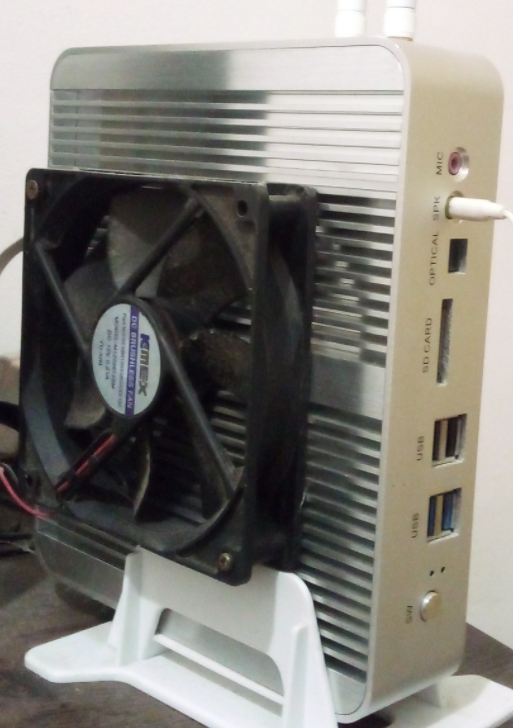
I got a pc that suffers from severe heating problems because of its poorly designed passive cooling case. I tried several strategies to put temperature under control, did a lot of tests with thermald, but ended up hacking a fan into the case. However, I still have problems with ssd temperatures.
Right now, as I write this, the nvme ssd is at 67ºC and easily goes beyond 80 or 90 during data transfers. I already lost 2 ssds before realizing this was the problem, because I was controlling just the cpu temperature.
There’s no physical way to force airflow where the ssd is, so I was wondering if there’s some way to throttle data transfer of something to prevent the ssd temperatures from reaching a threshold. All I could find was a vibecoded github repository. I don’t care if data transfer gets ridiculously slow, as long as the ssd remain safe, and I can’t consider getting any new hardware right now.
I’m currently running fedora 44 on that machine
Edit: I thought there was an easier software mitigation to that, but apparently, solutions will tend to the hardware side, so here are the hardware details:
- It’s an unbranded chinese cheap mini pc with a heat dissipation case that doesn’t dissipate well
- The ssd is mounted on the back of the motherboard. The model is a sandisk M.2 1TB 2280
Here’s a photo of the case, for the reference (don’t judge me lol):
You’ll never get good balance with that case as you’ve explained yourself.
If you can, remove the lid and run like that, or I’d be cutting big holes in it until it’s just a chassis. If you have cats/kids and need it protecting, maybe put it in a normal PC case. I’ve run a lot of machines naked and they breathe a lot better.
i had a similar setup and i drilled a hole into it and put a tiny fan on it
As others have said you need to heat-sink it. If the inside of the case is getting too hot as well then you need to try to heatsink it to the case itself since that’s meant to act as a heatsink. Without airflow you’re going to have issues no matter what.
In general to keep NVMe heat low you’d want to choose gen3-4 if possible as those run cooler than gen5. You’d want to choose one with DRAM built in rather than a pseudo-SLC cache which will heat up the drive dramatically when it’s hit. And you want a heatsink on the drive itself. Obviously you already have the drive but something to keep in mind for future reference.
There’s a lot of options for heatsinking including large aluminum heatsinks you can buy with thermal tape that can attach to the outside of cases. The problem with that in your particular instance is your case has fins so the contact area between such an external heatsink and your case would be bad and you’d need to jam thermal putty in there and probably still get mediocre performance.
There are mini-peltier pad elements you can buy cheap bags of which you hook up to an appropriate DC or AC power supply which you could attach to the outside of this case as well to directly cool it by drawing the heat out and apply cold. You can find pre-built ones with fans attached and USB power supplies if you just search peltier cooler USB.
But these do use electricity to run so they reduce the efficiency of your mini-PC and you still run into the problem of the fins on the outside creating very poor heat conductive contact.
Generally you want to avoid those kinds of passive cooling PC cases. Even the well built ones suffer heat issues for various components. They’re really meant for low end projects like running a display in a mall that shows a map and does basic tasks on a mini OS. Not for running a PC you’re regularly reading/writing files from.
One last thing. Unless that’s a reversed fan (unlikely) you really want it blowing air on the case not trying to pull air away as you have it. It’s much more efficient that way in most cases. There’s not enough clearance for it to be a very effective puller fan. So in my opinion try reversing the direction you have that fan mounted.
There’s a lot of options for heatsinking including large aluminum heatsinks you can buy with thermal tape that can attach to the outside of cases.
That sounds interesting. What kind of heatsink is that? Mind showing me some images?
Generally you want to avoid those kinds of passive cooling PC cases. Even the well built ones suffer heat issues for various components. They’re really meant for low end projects like running a display in a mall that shows a map and does basic tasks on a mini OS. Not for running a PC you’re regularly reading/writing files from.
Yes, that was my mistake and had to learn the bad way… but well, I got to stick with it for a while…
One last thing. Unless that’s a reversed fan (unlikely) you really want it blowing air on the case not trying to pull air away as you have it. It’s much more efficient that way in most cases. There’s not enough clearance for it to be a very effective puller fan. So in my opinion try reversing the direction you have that fan mounted.
I’m so used to using fans to pull air, that I didn’t think about that. Gonna give it a try too, thanks!

That would definitely solve my problem lol
Slap a thermal pad and a heatsink on that NVME and you should be fine, provided the rest of the case isn’t overheating.
Thanks. I will probably follow that direction, as others also suggested
About the rest of the case, it’s not overheating anymore, but other internal components are also suffering, like the wifi module, but those aren’t critical, so I’m not caring too much for now
The other person said heat dissipator. The usual phrasing is heatsink.
Your nvme is gonna have a four digit code like 2280 following the m2 designation. The last two digits indicate the length. If you cannot see the code or look up the product description then you can measure it. If you can’t measure it then you can instead look at the supported nvme form factor documentation for your case and ensure it meets the 2280 constraints. 2280 is the biggest m2 nvme ssd size so if your case supports it you’ll be fine.
Make sure it’ll work by looking first, but five bucks will get you a passive heatsink that will probably keep you in good stead over five minute transfers and twenty bucks will get you one with a little fan on it that will make sure you’re golden even during extended transfers.
Post the case model and I’ll look up what will fit in it with links and also see if there’s a good spot to sneak a fan in.
E: you asked the other person how a heatsink keeps temperatures down. It’s real simple: there’s a chip that gets hot. It gets hot because when It does something heat builds up and when it does a lot of stuff a lot of heat builds up. Heat goes away through several ways but here by radiating into the material around it, the connector, pcb and air. If the air is flowing past the hot chip then the difference in heat between the chip package surface and the cool incoming air is greater than that between the stagnant air that’s being heated up by the chip and more heat from the chip can be dissipated into that cool incoming air. Which is why a fan helps.
Air is a gas and gasses are generally not as good at taking on energy. Which is what heat is, energy. They’re bad at it because the particles of a gas are farther apart than those of a liquid or solid. If you dunked your hot ssd in a liquid like oil or encased it in a solid like aluminum you’d see much better temperatures because the hot chip could transfer its energy in the form of heat to the oil or aluminum much more efficiently because the particles of aluminum wouldn’t have to be at as high of an energized state to impart their energy onto their neighbors as those in the air have to.
A heatsink is slapping a big chunk of solid material (that’s good at transferring heat because it’s a metal, metals are good at transferring heat) on the hot chip to get more heat off the chip faster. They have little fins and crap to make their own transfer of heat to the air more efficient.
TLDR: if you glue a half inch nut to your chip the chip gotta heat that nut up.
Thank you. I added some hardware details to the original post.
My doubt with the heatsink is if it will be enough for a large difference, since the internal airflow is very poor, but it’s probably worth a try nonetheless. Thanks
Your doubts are warranted. Heatsinks at best drop component temps to ambient temps, so the heat from the cpu and gpu in such a tightly packed environment will severely limit any benefit it can offer. So this is sort of like debating whether to upgrade from 2" plastic wheels to 3" rubber/steel wheels on a pickup truck.
Heat is the enemy of electronics and considering the cost of internal components, investing in even an ultra-budget case with 2-3 fan mounts and some fans will always be worth it. Because if the motherboard dies tomorrow, most people would find themselves up shitts creek without a paddle.
Can you provide any more information that will help identify the mini pc? I really don’t wanna have to go geoguesser mode on image search to track down that case and point you at a heatsink that will fit.
You have a reply saying that a heatsink won’t fix the problem. That person is deadass wrong.
The problem is that the ssd gets hot when it does stuff. A passive heatsink provides more thermal mass and more surface area with a greater capacity to transfer its heat into the air. That will, 100% improve things.
I am speaking from years of experience when I say the following: a half inch nut from the hardware store superglued to the package (the black “chip”) is enough to extend the functional life of almost every nand storage thing.
The solution is to get that drives chip coupled to a piece of metal.
E: looks like the hnsun fmc-bm02 or fmc-bm20
Thank you four your help and for your humor. The case doesn’t have any labels of model numbers on the outside, so I don’t know the exact model. I got it from aliexpress a few years ago, but I deleted my account recently, so I can’t search my history. However, that fmc-bm20 indeed looks very similar. The holes in the back are at the same positions
I even tried improvising a fan into the back, where those holes apparently suited for 2.5’’ drives are, but they’re exactly where the support holds the case on the table
I have an idea, if you get a chance can you post a picture of the inside of the case? I’m looking specifically for the side that you had to put the ssd in.
I’m thinking a thermal pad might couple the ssd to the side panel if it’s close enough and work like the cases on recent macs do…
Seconding the heat dissipator. This is the easiest option, you can usually just rip it off any electronic scrap you may have laying around or can find easily, and while it would be nice to have new thermal paste, you should be able to just salvage whatever is still stuck to it. It’ll work well enough for a while.
As an alternative, you can throttle disk read/write speeds. Just not globally, not really.
Option 1:
Cgroups. Depending on distro you either already have some cgroups set up, or you should be able to set them up; and then just set max read/write speed for each group.
After setting control groups you can wrap your command in ionice to set the command to that group.
ionice -c3 <your cp command>
Option 2:
If you only notice this during file transfers and not during normal tasks, use a compatible file transfer application that lets you limit bandwidth, for example for rsync:
rsync --bwlimit=1024 source/ destination/
like others have asked, what case/mobo/SSD brand?
is the SSD on the front side or back side of the mobo?
sometimes what I do if the SSD is on the backside (and theres no mobo tray cutout), is to get a nice thick 10mm+ thermal pad and have it transfer heat to the motherboard tray.
if you can’t get airflow or fans to where the SSD is, your best bet is to try to transfer it somewhere else (aka case).
you can actually get copper heatpipe assemblies of different sizes/lengths/angles to help transfer the heat
I added the hardware details and a photo to the post.
Hmm transferring heat to the case isn’t a bad idea. The case would get really hot before, but after adding that indecent fan, now it’s cool
I see the unit now, your easiest mod is probably a thick thermal pad to transfer heat to the chassis. It might work out well if you combine that with those graphene heatsink stickers. (SSD > graphene heatsink sticker > thermal pad > chassis)
I have a feeling you might not have a good time with a standard SSD heatsink/dissipator. Those usually work best with at least a little bit of airflow. It might not be much different once the heatsink fully saturates. The heat needs to go somewhere
isn’t the whole case hot? Usually motherboard has sensors for monitoring the case temperature and control case fans. If the whole environment is above 45°C it makes everything hotter.
If you can check that an easy test would be to disable you CPU boost. I always do this anyway as boosting is a temporary way for a CPU to squeeze some extra performance at a huge energy/temperature cost. On my stress test this “only” get 10-15% more performance but without boost the CPU temperature never get above 50°C.
Because the CPU is not warming the case anyone everything is cooler, how much I don’t know though. Hopefully this could also reduce I/O on the SSD in general too but a cooler case is definitely better for every component.
The way to disable boosting depends on the CPU model as a starting point you can check https://wiki.archlinux.org/title/CPU_frequency_scaling#Configuring_frequency_boosting.
Yes, the whole case used to get hot. I didn’t try disabling cpu boost, but I reduced cpu frequency with thermald. In order to prevent overheating, it got terribly slow, and during summer (room temperature goes above 40ºC here), it wasn’t enough to prevent overheating, so I ended up adding a fan to the case. It’s ugly, but keeps it cool
But the problem now is that only the cpu used the case as a heatsink, and the internal airflow is terrible, so the ssd is overheating. I was wondering if there’s some way to throttle ssds in a similar way we do with cpus
Which case is it? Which nvme is it?
I added the hardware details to the post. It’s an unbranded case and a sandisk m.2 2280 ssd
Can’t you put a heat dissipator on your SSD ?
And I know you said you don’t want to buy any new hardware but if you want to throttle your SSD you Might as well buy an HDD. It’s not that expensive.
Would a dissipator be able to reduce that peak of around 90ºC to something below the limit of 70 (from the manufacturer’s site)?
About the hdd, this machine is a mini pc that only has 1 nvme slot and no sata connectors. It was a terrible idea to buy it in the first place, but I’m stuck with it for now…
I don’t know how it would reduce the temperature but I do know that it will reduce. Normally, with a heat dissipator you should expect to be under 70°C but that also kinda depends on airflow.
Ah… You dould try an external HDD but that wouldn’t solve everything so… Maybe try the heat dissipator, rather than going to a software that might well accelerate hardware deterioration.
Thanks, I will give it a try. By the way, an external storage isn’t a bad idea. How could I not think about it before?
Quite a lot of performance between a modern SSD and an HDD to be fair. You’d have to be down clocking to like 1% utilisation to meet HDDs.


